
Eliminate routine tasks and free up your team’s time

Microsoft Power Automate implementation

Professional Microsoft Power Automate setup for your company. We create reliable digital workflows that fully automate data transfer between applications, report completion, and communication without manual involvement or the risk of human error.

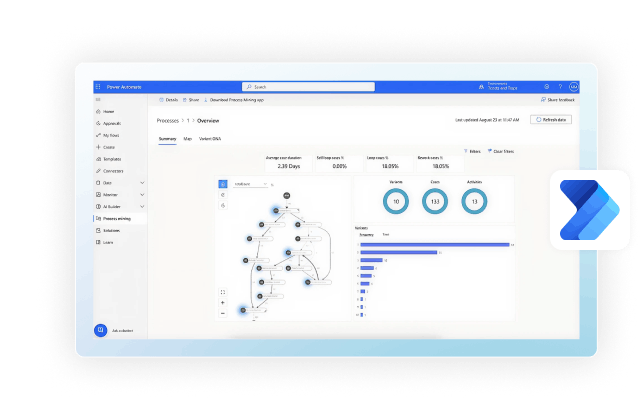
Microsoft Power Automate workflow interface

Official Microsoft Partner

25 Years

of ERP Automation Experience

200+

Completed Projects Across 12 Industries

Hybrid Expertise

BAS and Microsoft Dynamics 365 Business Central

Benefits of implementing Power Automate for business

Implementing Microsoft Power Automate is primarily about saving your team time and reducing costs. When routine work disappears, tasks are completed much faster, and the company can continue growing without constantly expanding headcount. Here are the key benefits businesses gain after implementing the system.

Automation of routine tasks

The service takes over hundreds of small daily tasks. Instead of copying rows or moving files from email, your employees can focus on analytics and sales. All repetitive tasks run in the background, strictly according to schedule and without delays.

Fewer errors

Human error can be costly for businesses, especially at the end of a long working day. The system operates strictly according to predefined algorithms. It does not get tired, forget anything, or miss an important line — and it fills in every field flawlessly in reports or customer documents.

Integration between different services

The platform seamlessly connects different applications into a single ecosystem, from cloud storage and warehouse systems to workplace messengers and CRM platforms. Data moves between them instantly and automatically. As a result, information gaps disappear, and all departments work with the same up-to-date figures.

Time and resource savings

Processes that previously required hours of work from several specialists can now be completed in minutes. The company gains a significant amount of productive time. These freed-up hours and team resources can be redirected toward business development and customer acquisition.

Faster business processes

Digital workflows eliminate internal delays when tasks are transferred between departments. Deal approvals and financial reporting can be completed automatically based on predefined triggers. Management receives up-to-date analytics without having to wait.

Scalability and flexibility

As the number of orders grows, there is no need to urgently hire additional employees and expand the team. Automated workflows can process significantly larger volumes of data without creating additional manual workload. This allows the business to scale while keeping personnel costs under control.

What motivates Ukrainian businesses to look for new ERP solutions

Outdated tools significantly slow down company growth, while modern ERP technologies provide management with complete and transparent control over the company’s finances and resources. This helps eliminate management delays and accelerate decision-making.

Request a Technical Audit

Problem

Balance consolidation takes weeks because bank statements are reconciled manually and data is spread across separate spreadsheets. Management doesn’t see the actual cash-flow position until 10–15 days later, after some decisions have already been made.

What Business Central Provides

Automated bank statement imports, instant cost calculation, and a complete financial period close within three days.

Problem

Inventory discrepancies, delays in order picking, and a lack of up-to-date data lead to downtime and financial losses. Stocktaking takes weeks, while shortages are often discovered only after a shipment has already been disrupted.

What Business Central Provides

WMS-enabled bin management, automated picking route optimization, and real-time tracking of goods in transit.

Problem

When data is transferred manually between Excel spreadsheets, it can be lost or duplicated. No department can be certain that it is working with up-to-date information.

What Business Central Provides

A single source of truth where creating a sales order automatically reserves inventory in the warehouse and generates an invoice without any manual data duplication.

Problem

The business owner is forced to personally approve minor payments because the process can’t be trusted. Delegating financial decisions without a reliable control system creates a risk of misuse or errors.

What Business Central Provides

A configurable approval matrix in the Workflow module based on transaction amounts, financial responsibility centers, and expense categories.

Problem

Managers spend up to 40% of their working day manually completing repetitive documents. Day-to-day operational tasks consume resources that should be directed toward strategic priorities.

What Business Central Provides

Document templates, automated recurring invoicing, and automatic order creation.

Problem

Collecting source documents creates chaos and stress for the accounting team. Data is scattered, some documents are missing, and every audit turns into a stressful project lasting several weeks.

What Business Central Provides

The system is designed from the outset around strict principles of transparent and easy-to-understand financial auditing. Every transaction is fully traceable, and a complete audit trail is generated automatically.

Problem

The on-premises database is not designed for large-scale operations. Multi-currency accounting, the simultaneous operation of multiple legal entities, and high transaction volumes lead to system failures and reduced performance.

What Business Central Provides

Automatic horizontal scaling of Azure cloud resources during peak workloads, without performance degradation or intervention from the IT team.

Key business processes automated with Microsoft Power Automate

The flexibility of Microsoft Power Automate makes it possible to automate routine work in virtually any department. We do not automate everything indiscriminately. Instead, we identify the areas where manual work slows the business down the most and where optimization can deliver the greatest impact. Explore ready-to-use solutions for key business functions.

Sales automation

Business analytics bar chart icon

Instant creation of CRM records from new inquiries, automatic lead distribution, and invoice generation for customers without delays.

Document workflow and approvals

Receipt document icon

Automatic approval of contracts and acceptance documents. The system routes files to the appropriate managers through a predefined approval chain without the risk of losing documents.

Financial processes

Cardboard shipping box icon

Payment monitoring, synchronization of bank statements with the CRM system, and automated generation of analytical reports without manual errors.

HR and recruitment

Manufacturing factory icon

Automated onboarding of new employees, rapid creation of corporate accounts, and collection of internal feedback and team surveys.

Customer support

Shopping cart icon

Instant classification and routing of new requests to the appropriate departments, automatic status notifications, and collection of service quality ratings.

Marketing and email communications

Business analytics bar chart icon

Dynamic customer database segmentation, trigger-based email campaigns based on website activity, and consolidation of advertising analytics into a single table.

File and data management

Receipt document icon

Synchronization between different cloud storage services, automatic sorting of incoming documents into folders, and database backups.

Internal operational processes

Cardboard shipping box icon

Integration of all corporate software into a single ecosystem. Complex tasks are performed automatically based on predefined triggers.

Planning to migrate from 1C:Enterprise / BAS to a modern ERP system?

Migrate from 1C:Enterprise / BAS to a modern, world-class ERP platform with support for Ukrainian accounting and tax requirements.

Assess Your Readiness to Migrate
  • Data and business logic preservation

  • Parallel operation of both systems during migration

  • Team training included

Pre-project assessment: two paths to an implementation decision

Rapid Assessment

Process: Conducted through two to three meetings with the client, during which we interview stakeholders and identify the key business pain points. Based on our expert assessment, we prepare a list of the required work and present it to the client.

Primary Purpose: Provides a high-level understanding of the project scope needed for the initial decision: which platform to choose and whether to proceed.

Outcome: We provide a preliminary estimate of the project scope, timeline, and budget. At this stage, the figures are indicative, and the actual costs and timelines may differ significantly from the initial forecast.

Duration and Cost: Takes from one day to two weeks and is provided free of charge.

Request an Assessment
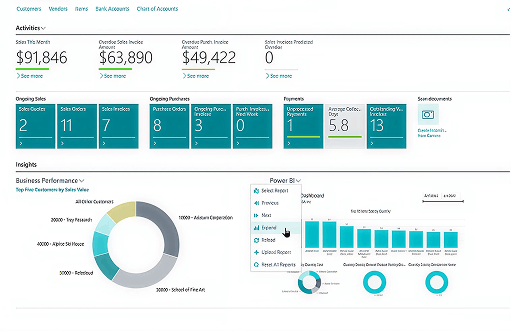
Business analytics and financial dashboard

Pre-Project Discovery

Process:

  • We run a series of interviews with users across every area that requires automation, with each meeting formally documented;
  • We build and present the target model using the client’s real examples, mapping the client’s actual business processes against standard functionality and future automation scenarios;
  • We conduct a Fit-Gap analysis to identify areas where standard solutions do not fit;
  • We prepare a technical specification for each automation scenario;
  • We produce the final project estimate.

Primary Purpose: Gives an understanding of the real scope of work before the project starts.

Outcome: Estimate accuracy is within a 10% margin of error, and cost stays under control. The client receives a validated model of the future solution, a technical specification, a project estimate, an implementation schedule, and a roadmap.

Duration and Cost: A separate phase preceding the main project. Cost ranges from 5% to 30% of the budget, depending on the project’s uniqueness.

Request an Assessment
Business software support interface

Methodology and stages of implementing automated solutions

Most challenges in automation projects arise not from the technology itself, but from the implementation approach. We have refined this methodology over 25 years across more than 200 completed projects.

1. Pre-project assessment

Search and data analysis icon

We conduct a series of interviews with users across all areas subject to automation and document the processes and requirements in formal records. We model the processes using the standard system configuration and validate their accuracy together with the client. Based on the Fit-Gap analysis, we identify discrepancies between business needs and standard functionality, prepare the technical specification, and assess the feasibility of each automation scenario.

2. Project schedule and roadmap

Office printer icon

Based on the results of the Discovery phase, CBPM Service specialists present the client with the model of the future solution, the technical specification, project estimate, and implementation approach. We agree on the project schedule and roadmap with the client and project team before implementation begins.

3. Migration scope alignment

Digital transformation magic wand icon

CBPM Service analysts define the list of objects to be migrated, the format and sequence of data transfer, and agree on these with the client.

4. Configuration and development

Business analytics bar chart icon

We implement the solution using a sprint-based methodology, with coordination meetings every two weeks and a mandatory monthly meeting with the project sponsor. This ensures controllability and transparent project status at every stage. We carry out all customizations in accordance with the approved technical specification and demonstrate the completed automation workflows to the client.

5. Initial training

Training and education icon

We provide initial training for the client’s team so that users can work with the new automation workflows while testing them against their own business processes.

6. Migration to the test environment

Computer workstation icon

We process master data and product catalogs separately from balances, including inventory, cash-related liabilities, settlements with customers and suppliers, and payroll. Before migration, we perform data mapping and remove outdated information. We carry out the export using dedicated scripts as of a specific date and transfer the agreed data scope to the test environment.

7. Test operation and refinement

Business partnership handshake icon

The client works with the new automation workflows in test mode. Based on the results, we either proceed directly to production operation or document a list of required refinements.

8. Production launch and support

Air travel and transportation icon

We implement the agreed refinements and confirm readiness for production operation. Our team then switches operational processes to the new automation workflows. CBPM Service consultants work alongside the client’s employees during the first reporting period close, identify any issues, and promptly resolve deviations. We then provide ongoing support and maintenance in accordance with the SLA.

Projects we’re proud of

Over 200 successful implementations across industries and businesses of different sizes.
95% of our clients recommend us. 25 years of experience.

View All Case Studies

How CBPM Service ensures effective Power Automate implementation

CBPM Service experts do more than simply connect software: they redesign data workflows end to end. We analyze the team’s actual workload and create Microsoft Power Automate solutions that optimize business processes, eliminate system errors, and begin delivering a return on investment within the first months.

Phased Power Automate implementation

We deploy the system step by step. We start with the most critical areas so the business can continue operating without interruption.

Preliminary business process analysis

We identify real operational issues across departments before configuring the software. First, we analyze your IT architecture, define the project scope, and prepare a roadmap.

Experience across different industries

We understand the particular demands of logistics, retail, and manufacturing.

Power Automate expertise

We have deep expertise in the platform’s architecture. We create custom integrations and complex logical workflows for a wide range of business needs.

Experience modernizing ERP systems

We have years of proven experience and established approaches to upgrading legacy platforms, helping prevent critical failures during launch.

Post-launch support and development

We do not leave you alone with the new system. We advise your team, quickly resolve issues, and add new functionality as needed.

Certified Microsoft partner

Our official partner status confirms our expertise. We configure tools in accordance with Microsoft standards.

Focus on efficiency and ROI

We design the system to deliver a fast return on investment. We reduce time costs and free employees from repetitive routine work.

What determines the success of an automation project: mutual responsibility for the outcome

Successful projects have several common conditions on the client’s side, and we discuss them before the project begins to ensure delivery within the agreed budget and timeline. Each point reflects a specific lesson learned from previous projects and has helped protect client budgets.

Responsible persons and roles

The client forms its own project team, including a key user and a project sponsor. Participant roles must be clearly defined: who is responsible for the budget, who makes decisions about expanding the scope of work, and who is responsible for completing specific tasks.

Coordination meetings

Regular coordination meetings give both parties a shared understanding of project status, budget, and workstreams. Status meetings are held every two weeks, while a monthly meeting involving the project sponsor is used to align on the overall status and next steps.

Project management

Our methodology always allocates dedicated time and budget for project management, including planning, execution control, and meeting documentation. This ensures continuous task monitoring and adherence to deadlines. The technical side is supported through structured procedures, including documentation of configuration changes and release management.

A sprint-based approach combined with adherence to these conditions is the key to successful implementation

Client-side resource allocation

We prepare and agree on a resource allocation plan for the client’s specialists and require adherence to it. The plan specifies which specialist must be allocated and for how much of their working time, for example, 50%, during a particular month. This helps prevent project team downtime and keeps the project on schedule.

Client team motivation

The client approves an internal document defining incentives for its project team based on the implementation outcome. Projects are delivered significantly more effectively when the client’s internal team clearly understands how its motivation is tied to the result.

Deadline discipline

If the client delays the agreed schedule by more than 30 days due to reasons on its side, the cost of subsequent work automatically increases by 30%. This rule is designed to keep the project within the agreed budget, scope, and timeline.

Downtime compensation

If the implementation team experiences downtime due to the client, this downtime is compensated at a coefficient of 0.7 of the previously planned workload. The team is allocated specifically to the project, and its time is reserved in advance.

Mutual guarantees from the implementation partner

When the client accepts the commitments listed above, we guarantee compliance with the agreed deadlines on our side. Otherwise, equivalent penalties apply to us. This symmetrical responsibility is designed to keep the project within the agreed budget and timeline.

Looking for an alternative to 1C or BAS?

Demand for migration from 1C to international platforms continues to grow, and Business Central is one of the most popular migration options.

Book a 30-Minute Consultation
  • Data and business logic preservation

  • Parallel operation of both systems during migration

  • Team training included

Tell Us About Your Project

    We respond within
    24 hours on business days

    1. Inquiry

    Leave your contact details and briefly describe your situation, including your current system, number of users, and the issues you would like to resolve.

    2. Introductory Call with a Manager

    A 30-minute conversation to discuss your pain points, timeline expectations, and the project delivery approach so we can select the right team for your needs.

    3. Pre-Project Discovery

    A technical audit of your IT architecture, definition of the project scope and boundaries, development of the system concept, and preparation of a preliminary roadmap.

    4. Proposal

    A detailed document outlining the scope of work, timeline for each project stage, and estimated cost.

    Frequently Asked Questions

    Of course. The system offers hundreds of ready-made connectors for popular global services. If your corporate applications are custom-built, outdated, or do not have an open API, we configure dedicated digital robots (RPA) that fully imitate human actions on a computer and transfer data accurately without errors.

    We configure and launch simple tasks within a few days. Complex multi-level processes involving several departments are developed in stages. A complete turnkey Microsoft Power Automate system typically takes anywhere from two weeks to one month to design and implement.

    It depends on the solution architecture and the types of databases being connected. Basic Microsoft Power Automate functionality is often already included in your existing corporate Microsoft plans. If premium features are required, we carefully calculate the costs and select the most cost-effective licensing option.

    The platform immediately detects any failure and automatically sends a notification to the administrator. During the analysis and development stage, we define clear error-handling rules so that no document or data record is lost. Our technical support team can quickly adjust the automation workflows to accommodate changes in third-party software.

    Yes. The platform is built on a low-code approach, which minimizes the need for programming. After the project is completed, we provide comprehensive training for your team. Your specialists will be able to make basic changes to Microsoft Power Automate workflows independently, without involving external developers.