
Payroll, taxes, banking transactions, local purchases, and expenses were recorded through financial journals and other business transactions. There was no consolidated information across the group of companies.
Management accounting • Financial data exchange • Consolidation
Exchange of period expenses and income between local databases and the Business Central management database
Each local database maintained its own statutory accounting separately, so consolidating the group’s income and expenses into a single view required manual reconciliation of data from several systems in spreadsheets. The CBPM Service team built a controlled exchange between the local databases and the management database: accounts, dimensions, and entries are matched automatically, while the client’s finance team receives consolidated data without manual consolidation.

📑 Expenses and income are consolidated
Without manual consolidation, data from local databases is transferred to the management database automatically
📉 Risk of duplication and manual errors reduced
Accounts, dimensions, and transactions are matched between databases
🕐 Bank statements are no longer transferred manually
Loading and allocation of payments are automated through data exchanges
Situation before the project
Expenses existed only in local databases, while management accounting required them to be consolidated in the management database to prepare a consolidated balance sheet and P&L.
Objectives and critical requirements
The client requested the development of a controlled data exchange that would provide the finance team with a consolidated view of the group without changing the accountants’ familiar workflows in local databases.
1. Scheduled exchanges from local databases to the management database

Configure regular data transfer from each local database to the management database.
2. Mapping of charts of accounts and dimensions

Map accounts and dimensions from local databases to the management database, including dimension values.
3. Control over exchange scope

Provide the ability to exclude specific transactions or accounts from data exchange.
4. Consolidation of income and expenses for financial results

Collect income and expenses from local databases in the management database to calculate management financial results.
5. Automation of bank statements and transaction transformation

Automate bank statement imports through payment exchanges and ensure the transformation of transactions that are classified differently in statutory and management accounting.
Technical constraints:

Different local databases could use different charts of accounts. Some were similar or identical to the chart of accounts in the management database, while others were completely different.
Organizational constraints:
The process could not disrupt the work of managers in CRM or accountants in local databases, so some exchanges with the accounting databases were moved into a separate detailed technical specification.
What the CBPM Service team did and how
Mapping accounts and dimensions between databases
The chart of accounts was mapped between the management database and local databases: a mechanism was implemented to determine which local account corresponds to each account in the management database. Dimensions were mapped in the same way between local databases and the management database.
The solution also allows specific accounts to be excluded from the exchange. If an account is excluded, transactions posted to it are not transferred to the management database.
Data transfer and recording in a dedicated table
Data from local databases is transferred to the management database, stored in a dedicated table, and then posted in the management database.
Accountants continue handling day-to-day operations in local databases: importing and allocating bank statements, posting documents, and recording transactions. Once these operations are posted locally, the relevant expenses are transferred to the management database through the configured exchanges.
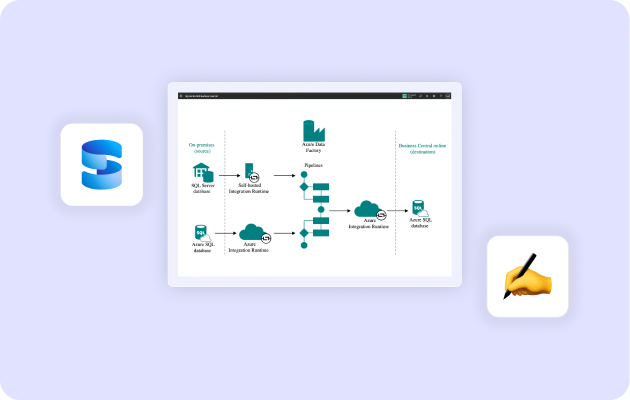
Access to source documents from local databases
The management database was configured to provide access to documents attached in local databases, whether scanned or electronic, without requiring users to open each local database separately.
Complex aspects and non-standard solutions

Different local databases used different charts of accounts, so account mapping to the management database had to be configured, along with mapping of dimensions and dimension values. Separate exceptions were also defined for accounts that should not be transferred to the management database.

Foreign exchange differences remain a separate complex issue: the local currency of the management database is the US dollar, while local databases use the national currency of each country. The team is separately analyzing whether these differences should be recognized as exchange rate differences or as other income or expenses.
Special attention was also required for the transformation of business transactions, since the same operations may be classified differently in statutory and management accounting.
Logic of separation: what is created initially and what is transferred through exchanges
Core business activities, including purchases and sales, are created initially in the management database.
Expenses and income that arise in local databases and are not related to core business activities are transferred to the management database through exchanges.
In local databases, transactions are recorded through documents or financial journals: bank statements are imported and allocated locally, after which the data is transferred to the management database through exchanges.

Implementation methodology
The implementation followed the CBPM Service sprint-based methodology: we gathered the client finance team’s requirements for account mapping and analytical dimensions, aligned on the concept, and documented the details in the technical specification.
After development and testing, the exchanges were demonstrated to the client. We incorporated clarifications regarding account exclusions and foreign exchange differences, then presented the final version and launched the exchanges into production operation.
Support and consulting continue as part of the ongoing working process.

Working with the client’s team
One of the key factors in the successful delivery of the project was the client’s appointment of a responsible project manager with decision-making authority, while a top executive joined as project sponsor and participated in monthly coordination meetings.
This made it possible to maintain efficient communication, resolve issues in a timely manner, and control task execution without delays or the need for escalation.

Results

Automated exchange of expenses and income: a system was developed to transfer period expenses and income from local databases to the management database, including payments already posted in the local databases.

Account and analytical dimension mapping: the charts of accounts in the management and local databases were mapped, along with dimensions and dimension values, with the ability to exclude specific accounts from the exchange.

Transaction transformation: the transformation of transactions that are classified differently in statutory and management accounting was automated. Data received through exchanges is stored in a dedicated table and then posted through the financial journal to the relevant ledgers.

Less manual work and lower risk of errors: exchange automation reduces manual work and the risk of errors during data transfer, while eliminating duplicate data entry in the management and local databases.
Consolidated management reporting: income and expenses from local databases can now be consolidated in the management database to calculate management financial results and prepare other reports.